
How AI Improves Pronunciation for Non-Native Speakers
Short AI-led drills fix specific sound, stress and rhythm issues so non-native speakers are clearly understood at work.

If people can’t catch what you’re saying at work, even small pronunciation gaps can slow meetings, calls, and team chats. I see AI vs. traditional language training for teams shows why these tools are useful because they give instant feedback on sounds, stress, rhythm, intonation, and linked speech so you can fix one issue at a time.
Here’s the short version:
- The goal is clarity, not accent change
- AI checks how you say words, not just the text it hears
- Fast feedback helps you correct errors on the spot
- Short daily practice works better than long weekly sessions
- Work phrases beat random vocabulary
- Teams can track progress through job behaviour, like fewer repeats and smoother calls
- In Quebec, English/French practice may also support Bill 96 and francisation tracking by introducing AI in your language school
A few details stand out. The article points to 10- to 15-minute daily sessions and focused drills on 3 to 5 problem words, 2 to 3 job phrases, and one work scenario. It also notes that common speech-to-text systems can struggle with strong accents, which is why learner-focused tools matter.
What this means for you is simple: if you practise the phrases you use in meetings, presentations, and customer conversations, AI can help you sound clearer and feel less tense when speaking.
The World's Best AI Pronunciation Tool
How AI identifies pronunciation errors
Most people don’t notice their own pronunciation gaps while they’re speaking. And that matters at work, where a manager, client, or teammate may need to understand you right away.
When you speak into an AI tool, it breaks your speech into parts that can be measured. Those parts shape whether your speech sounds clear in day-to-day workplace conversations.
How AI analyses sound, stress, and intonation
Each one plays a part in how fast and how well coworkers understand you.
| Speech Feature | What AI Checks | Workplace Impact |
|---|---|---|
| Sound Level | Individual vowels and consonants | Prevents misunderstood names, numbers, or technical terms |
| Word Stress | Correct emphasis on syllables | Keeps words recognisable and distinct |
| Rhythm & Pacing | Speed and flow of sentences | Helps listeners follow complex explanations |
| Intonation | Pitch and tone patterns | Conveys the right intent - question vs. statement |
| Linking | How sounds connect between words | Makes speech sound fluid rather than disjointed |
Standard speech-to-text tools often miss accented speech, and that can distort words. Séraphin Hochart, CTO and co-founder of Conversaflex, explains it plainly:
"A lot of the models are not great at detecting people with strong accents... we're building our own because... sometimes the words get messed up." [2]
That’s why tools built for learners matter. A plain transcription tool may turn your speech into text, but it won’t always show why something sounded off.
Why instant error detection helps learners improve
The big advantage of AI feedback is speed. You finish speaking, and the tool points to the exact issue right away.
As Hochart puts it:
"What the AI does is analyze all the parts of that sentence that I'm struggling with and gives me some feedback... where should you put the stress on the sentence? How do you link words... What's the rhythm, you know, should you go faster or slower?" [2]
That shifts the problem from vague to fixable. Instead of thinking, “Something sounded wrong,” you can see what needs work and practise it again.
How AI feedback improves pronunciation step by step
Spotting the mistake is only the first step. AI gives you a clear way to work on it. That shifts pronunciation from a fuzzy problem into something you can practise, check, and fix.
The record, review, and repeat practice loop
The process is simple. You pick a sentence or phrase linked to your job or learning goal - maybe something from a meeting, a call, or a presentation - then record yourself saying it. The AI analyses the recording and points out the sounds or words giving you trouble. After that, you review the feedback, make the correction, and record it again [2].
As Séraphin Hochart, CTO at Conversaflex, says:
"The tool is fairly simple. You just say a few sentences every day and it really helps you focus on what matters." [2]
That’s part of why this works so well. Short daily practice sessions - even a few sentences at a time - are much easier to stick with.
Which feedback type helps with which problem
Pronunciation problems don’t all look the same. A vowel issue is different from a rhythm issue. Stress mistakes aren’t the same as saying a phrase in a way the listener mishears. So the kind of feedback matters.
| Feedback Type | Pronunciation Problem | What the AI Provides |
|---|---|---|
| Sound-Level Analysis | Unclear vowels or consonants | Identifies specific parts of the sentence where you are struggling [2] |
| Stress-Level Feedback | Incorrect emphasis or robotic delivery | Tells you which words or syllables to stress so speech sounds natural [2] |
| Intonation & Rhythm | Flat tone or choppy pacing | Provides tips on rhythm, speed, and word linking [2] |
| Transcript Check | Misheard workplace phrases | Shows exactly how the AI heard you [4][2] |
| Job-Specific Prompts | Off-topic phrases | Tailors feedback to specific goals, such as talking to a colleague about a specific topic [2] |
The "View Analysis" feature on Conversaflex sorts your recording into categories, so you can tell whether the problem is a vowel sound, a stress pattern, or the way two words blend together [2]. That level of detail gives you a direct next move instead of leaving you stuck with a general sense that something sounded off.
"The AI does is analyze all the parts of that sentence that I'm struggling with and gives me some feedback... [including] how you could improve your fluency." - Séraphin Hochart, CTO, Conversaflex [2]
Use the feedback to isolate the exact pattern before moving on.
How to practise the right pronunciation skills with AI
Train difficult sounds and common word pairs
Once AI shows you what's off, the next step is simple: practise the exact thing that's causing trouble. Use the feedback to work on specific sounds, stress patterns, and short phrases that trip you up on the job.
For many non-native speakers, the hardest parts show up in day-to-day work language: job terms, names, and numbers. If you say a client's name the wrong way or hesitate over a figure during a call, it can weaken an otherwise strong message. That's why short drills work so well. Record the word, get feedback, then say it again. That tight loop helps build accuracy and speeds up progress.
After you work on single sounds, move into full sentences. That's where stress and rhythm start to matter most.
Practise stress, rhythm, and sentence flow
Clear speech isn't just about saying each sound the right way. It also depends on how you move through a sentence: what you emphasize, how words connect, and whether your pace feels smooth. That's what helps speech sound natural instead of robotic.
AI gives you a practical way to work on that. You can record a full sentence, like a customer greeting, an appointment confirmation, or a set of instructions. Then the feedback shows where the stress fell in the wrong place or where your pacing drifted. The aim is clear, natural speech in actual meetings.
Start a bit slower in the AI tool, then work up to your normal speaking speed.
Use workplace phrases instead of random vocabulary
The best pronunciation practice is the language you use at work. Generic word lists won't help much when you're in a real conversation. High-frequency job phrases, like introducing your company, talking about product launches, or giving instructions in meetings, make practice more useful right away [2][3].
Conversaflex tailors practice to your role, level, and native language, with training in English and French [2][3].
Keep your phrase list short. Repeat it every day, and note which ones still need work. Then use those same phrases in short daily sessions so the pattern starts to stick.
How to build a repeatable routine and apply it across a team
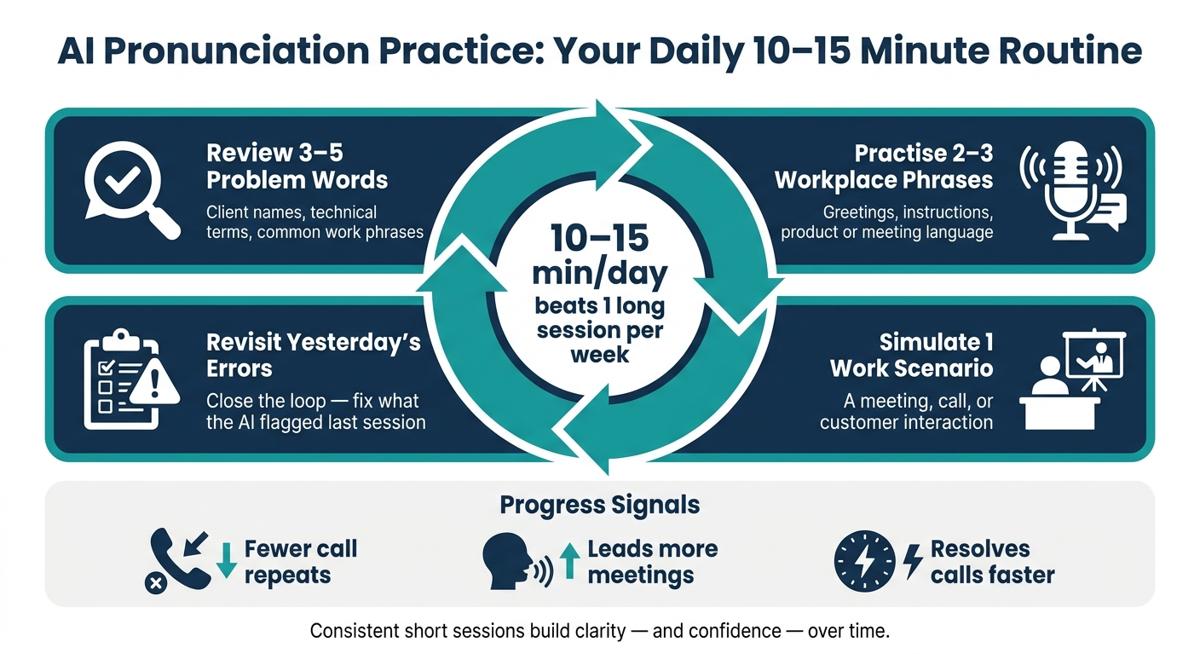
Build a 10- to 15-minute daily practice routine
Once AI shows you what to fix, the next step is simple: turn that feedback into a habit.
A 10- to 15-minute daily session tends to improve pronunciation more than one long session each week. Short practice works better because it fits into the workday and keeps the material top of mind.
A simple routine looks like this:
- Review 3 to 5 words that caused trouble recently, such as a client's name, a technical term, or a common work phrase
- Practise 2 to 3 workplace phrases
- Run one realistic scenario
- Review yesterday's flagged errors
You can do this on your phone, during your commute, or between meetings. The main thing is to make it part of your day. Put it in your calendar like any other meeting [1][4][2].
Track progress with clear workplace goals
For managers, this same practice data can show whether clearer pronunciation is showing up in day-to-day work. The focus should be on workplace behaviour, not test scores.
Look at signs like whether people:
- lead more meetings
- resolve calls faster
- repeat themselves less
Those are the signals that pronunciation practice is carrying over into job performance [1][2].
Conversaflex gives administrators a centralised dashboard to track learning time, practice frequency, and fewer pronunciation errors across an entire team. For organisations in Quebec, automated progress reports can be aligned with OQLF francisation plans and Bill 96 requirements and penalties, which cuts down the manual tracking load for HR [1][3].
Conclusion: How to get the most out of AI pronunciation practice
AI pronunciation tools work because they close the gap between knowing a language and sounding natural in it. They catch errors right away, give specific feedback, and let people practise the exact phrases their job calls for, without the pressure of a live audience.
Use short daily sessions, role-based phrases, and steady repetition, and pronunciation practice becomes a measurable part of how your organisation communicates.
FAQs
Can AI help if my accent is strong?
Yes. AI can still help if your accent is strong. Conversaflex is built to support and understand accented speech during French and English practice.
It gives you real-time audio analysis and pronunciation coaching, with clear feedback that helps you build fluency and confidence, especially in workplace conversations.
How long before I notice clearer speech?
You may notice clearer speech and a bit more confidence from your very first day of practice. Real-time pronunciation feedback and fluency tips help you adjust on the spot, so you're improving while you speak.
With regular use, the AI coach gives immediate guidance that fits your needs. That helps you make steady progress, especially when you're practising workplace situations that match your day-to-day job.
What should I practise first for work?
Start with a quick CEFR-level assessment to see where you stand. It gives you a clear starting point and helps shape a learning path that fits your role, industry, and native language.
Then move into AI-led workplace conversations and pronunciation feedback built around the words, phrases, and speaking tasks that matter most in your job.




![Cover Image for Corporate Language Training Costs: Conversaflex vs. Tutors, Classes and Apps [2026]](/_next/image?url=%2Fassets%2Fimages%2Fblog%2F68b2425f68bb5e38327dcb5b-1756542781388.jpg&w=3840&q=75)
![Cover Image for Workplace French Training in Canada: Formats, Costs and Funding [Guide 2026]](/_next/image?url=%2Fassets%2Fimages%2Fblog%2Fworkplace-french-training-canada-2026.jpg&w=3840&q=75)